.svg)
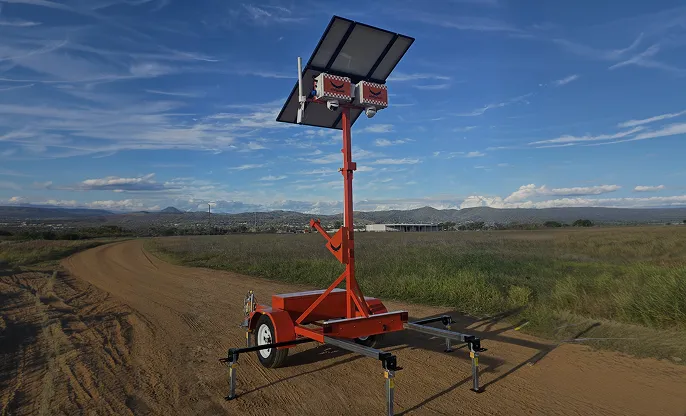
A solar camera tower can stand on a bare block with no mains power, no cabling and nobody on site after knock-off, and still record all night and send an alert to your phone the moment someone climbs the fence. So how do solar security cameras work when there's nothing to plug into? Every unit runs the same loop: the sun charges a battery by day, the battery runs the cameras and modem by night, and a 4G or satellite link gets the footage off site.
This guide walks through each part of that loop (panels, LiFePO4 batteries, masts, cameras, and 4G or Starlink), then compares towers, trailers and forkliftable bases, lists the specs worth comparing on a quote, and covers when hiring beats buying.
How do solar security cameras work? A solar panel charges a battery (commonly lithium iron phosphate, or LiFePO4) during the day, and that battery runs the cameras, recorder and 4G or Starlink modem around the clock. Mounted on a tower, trailer or forkliftable base, the system records on board and sends live view and alerts to your phone, a dashboard or a control room, with no mains power or cabling.
Strip away the steel and a solar security camera is a small off-grid power system with cameras attached. Four parts do the work, and each one depends on the others:
The panel only works in daylight, but everything else runs 24 hours. That means the system lives on a daily energy budget. What the panels put in on a short winter day has to cover what the cameras, lights, modem and siren take out overnight, with something left over for the next grey day. A well-sized unit banks enough reserve that a run of bad weather doesn't switch the cameras off.
The structure carrying it all matters as much as the electronics. A tall mast gives the cameras a view over fences and stacked materials, a steel base keeps it steady in wind, and the format decides how easily it moves. Siteguard builds its solar security cameras around this loop, so a unit can protect a site from day one, before any mains power is connected.
The panel's job is to harvest enough energy in daylight to carry the system until the next morning. Output depends less on the panel's rated wattage than on where and how it sits: the angle, the direction it faces, and whether anything shades it for part of the day.
Season and location change the maths. The Bureau of Meteorology's average daily solar exposure maps show exposure is lowest across southern Australia in June, when the sun sits low, while northern areas lose some exposure over summer to monsoon cloud. A unit that runs comfortably in Brisbane in October has far less margin in Hobart in July, so ask how a system is sized for winter on your site, not for an average day.
On a working site, three things cut panel output more than people expect:
Siteguard's Starlink Tower is built with solar panel mounting points for off-grid operation, so the panels are part of the engineered structure rather than an afterthought bolted to it.
The battery is what lets a solar camera keep working at 3am. Most of the energy the cameras use comes from storage, not straight from the panel, so battery capacity sets how long a unit keeps running when the sun doesn't cooperate. Suppliers describe this as days of autonomy: how many days the system can run on a full battery with little or no charge coming in.
Lithium iron phosphate (LiFePO4, often shortened to LFP) has become a common choice for off-grid cameras, for practical reasons:
Two caveats. LFP doesn't like being charged below freezing, so units on frosty inland or alpine sites need a battery management system that protects the pack in the cold. And capacity alone isn't the answer: a twin-camera unit with a modem and white light draws more than a single fixed camera, so autonomy has to be quoted for the actual configuration. For sizing and cold-weather detail, see our guide to LiFePO4 batteries in solar CCTV towers.
Ask any supplier three things: the days of autonomy for the exact cameras and connectivity you're getting, how that figure holds up in your site's worst month, and which features switch off first if the battery runs low.
Starting a build before the power's on?
See the setup Siteguard recommends for construction sites, from Twin Cam towers to after-hours monitoring and timelapse.
Siteguard for constructionHeight is free coverage. A camera at fence height sees the fence. Raised on a mast, it sees over hoarding, containers and parked plant to the far side of the laydown. Mobile masts telescope or wind up, so the unit travels low and stands tall on site. Ask for the extended height and the wind rating: a mast carrying cameras, lights and a dish has to stay steady in a strong southerly, or the footage shakes when you need it most. Siteguard's Starlink Tower is fully engineered and wind rated.
On top of the mast, the camera choice decides what the footage can actually prove. Siteguard's tower range shows the main options:
| Tower | Coverage | Listed features | Best for |
|---|---|---|---|
| Single Cam | 95° field of view | 4K 8MP, 24/7 recording, 30-day storage, intruder alerts, siren and audio | An entry point or a single asset |
| Twin Cam | 180° field of view | Smart alerts, siren and strobe, battery backup | Broader perimeter coverage; Siteguard's most popular tower |
| Pan & Zoom 360° Cam | 360° PTZ | Zoom up to 1km, low-light, remote control, live alerts | Large civil, mining and multi-stage sites |
| Custom | Mix and match cameras on one tower | Options such as 2x 360° PTZ with 1km zoom | Sites that need no blind spots |
A fixed camera watches one view constantly and records everything in it. A PTZ (pan-tilt-zoom) camera can be steered and zoomed remotely to read a plate or check a figure at the far fence, but it only looks one way at a time. Plenty of sites pair the two for that reason.
.webp)
Resolution matters as well. 4K and 8MP describe roughly the same resolution, about eight million pixels, and more pixels help identify a face or plate at distance, at the cost of more storage and mobile data. Our article on camera resolution for site security covers that trade-off.
Placement is the other half of coverage. Gates, laydown areas, sheds and parked plant all need eyes on them, and the right number of units depends on layout more than area. Our guide to how many security cameras a construction site needs gives rules of thumb by site size.
Cameras record on the unit, so a site keeps its footage even if the link drops. Siteguard's Single Cam, for example, lists 24/7 recording with 30-day storage. The connection is what turns that recorder into a live system, carrying live view, alerts and remote playback to your phone or dashboard.
A 4G modem is the simple option wherever there's decent mobile signal. Siteguard's trailers list 3G/4G, remote WiFi, GPS and UHF radio among their features. The catch: a strong signal on your phone in the site office isn't proof of a usable upload signal at the far corner of the site, and many regional and remote jobs have no coverage at all.
That's the gap Starlink fills. Siteguard's Starlink connectivity integrates satellite internet with its camera systems and the Foreman dashboard, supporting live streaming, remote camera access and real-time alerts where 3G and 4G don't reach. The trade-off is power draw: a satellite dish uses more than a 4G modem, so the solar and battery have to be sized for the extra load.
For the most remote jobs, the Siteguard Starlink Tower pairs satellite connectivity with heavy-duty steel construction, weather protection and a vandal-resistant base. It's aimed at mining exploration, remote civil infrastructure and large rural properties.
Wherever the footage lands, it should land in one place. Siteguard Foreman brings every camera, alert and recording across your sites into one browser-based dashboard, with playback, event reports and timelapse. If your site has no power and no reliable signal, our guide to protecting remote sites with no power, internet or people covers the full setup.
Test the mobile signal where the unit will actually stand, not in the site office or the car park. If it's marginal there, plan for Starlink from day one rather than after the first missed alert.
A camera that only records is a witness. What stops an intrusion is detection plus a response while the person is still on site. Detection software watches set zones for movement and, with AI classification, tells a person at the fence from a branch moving in the wind. In Foreman, event linkage sets what happens next: siren, strobe, push notifications, or all of them.
Then someone has to act. With 24/7 control room monitoring, Siteguard's Australian-based operators verify every alarm before taking action, issue audio warnings and activate the siren straight away, and escalate to the relevant authorities when required. That human check is what stops false alarms becoming midnight phone calls.
Solar power shapes deterrence too. Sirens, strobes and lights all draw from the same battery, so a unit set to flash at every passing kangaroo will run its reserve down. Good zone setup protects the energy budget as much as the site.
To see how sirens, strobes and white light turn intruders around, read how CCTV tower deterrence works. For the full chain from detection to response, our guide to what happens when a camera detects an intruder walks through it step by step.
Four towers. One platform.
Compare the Single Cam, Twin Cam, Pan & Zoom 360° and Custom towers, available to hire or purchase, backed by Australian support and a 24/7 control room.
See the tower rangeThe electronics are much the same across formats. What changes is how the unit gets to site, how it moves once it's there, and how much room it takes up. Three formats cover most jobs.
A standalone tower carries the mast, cameras, panels and battery on a compact base. It suits construction and civil sites that need wide perimeter coverage and units that shift as stages change. Siteguard's solar camera towers come in Single Cam, Twin Cam, Pan & Zoom 360° and Custom configurations, built for rapid deployment.
A trailer puts the whole system on a road-certified steel chassis you can tow. Siteguard's solar CCTV trailers are self-contained and built for temporary construction sites, events and festivals, and remote or off-grid locations, with options including solar power, Starlink, lighting and custom camera setups. If a unit needs to move every few weeks, or between towns, towing it beats booking a truck.
.webp)
A forkliftable or skid base has no wheels. It's placed by forklift or crane and stays put, which suits long-term positions, hardstand in depots and yards, and tight spots a trailer can't reverse into. Siteguard's Starlink Tower, for instance, comes with a forklift and lifting hook for easier transport and installation.
| Format | Moves by | Best for | Trade-off |
|---|---|---|---|
| Tower | Plant or truck, depending on the base | Construction and civil perimeters that change stage by stage | Each move needs a vehicle or plant on hand |
| Trailer | Towed behind a ute or truck | Short jobs, events, temporary compounds, sites that move often | Needs vehicle access and a level spot; larger footprint |
| Forkliftable base | Forklift or crane via lifting points | Depots, yards and long-term fixed positions | Not road-mobile; needs plant to relocate |
For a full side-by-side on access, footprint, mast height and cost, see CCTV tower vs CCTV trailer: which suits your site.
Format and camera choice follow the site, not the other way round. These setups come straight from what Siteguard recommends by industry:
Sites rarely stay the same shape. A tower covering the slab in month two can be in the wrong place by month six, and a second unit may be needed when the next stage opens. Plan for relocation from the start. Our article on moving and adding site cameras as your project grows explains how relocation and scaling coverage work.
"We run 6 construction teams and we can easily relocate the system between teams as required, without the need for specialist staff to pack up transport and set up." Michael, Construction Manager, Tamworth Regional Council
Quotes are easy to compare on price and hard to compare on anything else. These are the specs that decide whether a unit does the job on your site:
| Spec | What to ask | Why it matters |
|---|---|---|
| Power and autonomy | Days of autonomy for this configuration, in winter, at your location | Decides whether the cameras stay on through a cloudy week |
| Battery | Chemistry, capacity and cold-weather protection | Affects lifespan, heat safety and charging in frost |
| Cameras | Resolution, field of view, PTZ zoom range | The difference between seeing movement and identifying a person or plate |
| Low light | Night vision, infrared or white light | Most incidents happen after dark |
| Storage | Days of on-board recording | Your evidence if the link drops |
| Connectivity | 4G, Starlink or both, and who manages the data | Live view and alerts depend on it |
| Detection and deterrence | AI classification, zones, siren, strobe, audio | Separates an alarm worth acting on from noise |
| Monitoring | Human verification, response steps, escalation | Who acts at 2am |
| Mast and structure | Extended height, wind rating, tamper resistance | A stable, clear view in bad weather |
| Compliance and origin | NDAA status, where it's designed and built, local support | Government and tier-1 contractors may require it |
The last row deserves its own homework, especially if you work on government or tier-1 projects:
Siteguard's towers are available to hire or purchase, and the right call comes down to how long you need cover and how often the units will be reused.
Hiring suits a single project, a defined risk period such as the Christmas shutdown, or a site where you don't yet know how many units you'll need. There's no capital outlay, and the units go back when the job finishes. Site security camera hire suits builders running one or two jobs at a time.
Buying starts to make sense when units will move from job to job for years: builders with a steady pipeline, councils protecting assets long term, and hire companies adding units to their own fleets. The break-even depends on project length, fleet size and utilisation between jobs, which our hire vs buy cost comparison works through.
If you're leaning towards ownership, see Siteguard's towers and trailers for sale. If hire is the likely answer, the guide to site security camera hire costs covers terms and coverage across Australia.
Most solar camera problems on site trace back to setup, not hardware. The usual culprits:
Yes. The panel charges the battery during the day and the battery runs the cameras overnight. Low-light cameras, infrared or white light let them see in the dark, and units with sirens and strobes can respond to an intruder after hours.
It depends on battery capacity, the cameras and connectivity on the unit, and how often the deterrents fire. Suppliers quote this as days of autonomy, so ask for the figure for your exact configuration in winter at your site's location.
They don't need WiFi to record, because footage is stored on the unit. They need a 4G or Starlink connection for live view, remote playback and instant alerts. On sites with no mobile coverage, Starlink keeps the system online.
Yes, if they're sized for it. Southern Australia gets the least solar exposure in June, so the panels and battery need enough capacity to cover short days and cloudy runs. Keep panels clean, unshaded and facing north.
A tower carries the mast, cameras and power system on a compact base, while a trailer puts the same system on a road-certified chassis you can tow. Towers suit perimeter coverage on construction and civil sites; trailers suit short jobs, events and sites that move often.
Yes. Footage is recorded to storage on the unit, so a dropout doesn't stop recording. Siteguard's Single Cam, for example, lists 30-day storage. Live view and alerts resume when the connection returns.